
You can now combine load list filters with AND and OR. Before, every filter had to match (AND). Now you can put filters into an OR group, so a load shows up if it matches any filter in that group.
Example: show loads for customer Apex Industries that are either In Transit or assigned to driver Ana Kris.
Customer is Apex Industries AND ( Status is In Transit OR Driver is Ana Kris )
How AND and OR work
- Top level (AND): a load must match every top-level filter.
- OR group: a load must match at least one filter inside the group. The group shows in parentheses, with OR between the filters.
- Choosing more than one value inside a single filter (for example, two customers) already means "either one".
Step 1: Add your first filter
- Go to Dispatch and open your load list view, such as New List for Loads.
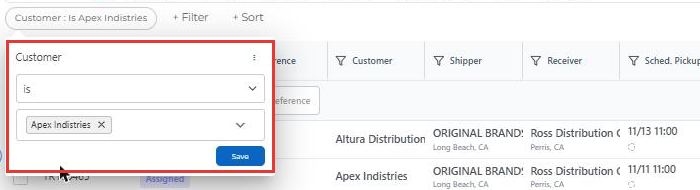
- Click + Filter and choose a field, for example Customer.
- Pick the value and click Save. This filter goes in the Top level, so every load must match it.
Step 2: Start an OR group
- Click + Filter again.
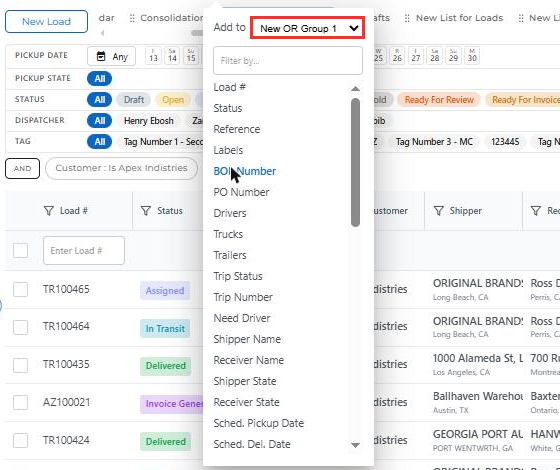
- At the top of the list, change Add to from Top level to New OR Group 1.
- Choose the field, for example Status, pick In Transit and click Save.
Step 3: Add more filters to the same OR group
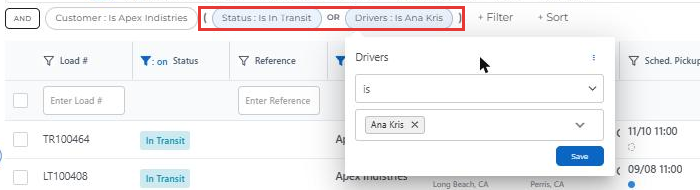
- Click + Filter, set Add to to OR Group 1, and choose another field, for example Drivers.
- Pick the driver and click Save.
The filters in the group now show in parentheses with OR between them.
Step 4: Check your results
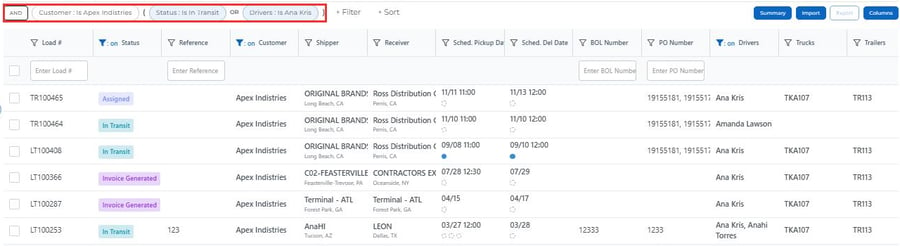
The list now shows Apex Industries loads that are In Transit, plus any Apex Industries loads assigned to Ana Kris.
Step 5: Change the logic any time
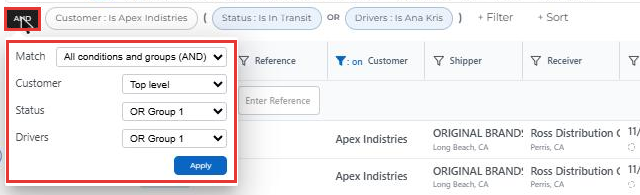
Click the AND button to the left of your filters. In the panel that opens you can:
- Set Match to All conditions and groups (AND) or Any condition or group (OR).
- Move any filter to Top level or to an OR group.
Click Apply to update the list.
Tip: Your filters are saved with the list view, so they stay in place the next time you open it. To remove a filter, hover over it and click the red x.
💬 Need help? Contact us anytime at help@truckpedia.io.