
If a customer sends you a weekly sheet of load rates, you can now update the charges on all of those loads at once. Upload the sheet, and Truckpedia finds each load by its Reference number and updates its charges. No more opening loads one by one.
Before you start: Bulk Update Loads works for companies that are fully switched to the new load charges (Charge2). If you see the message "Only companies fully switched to Charge2 can update loads in bulk", contact us at help@truckpedia.io.
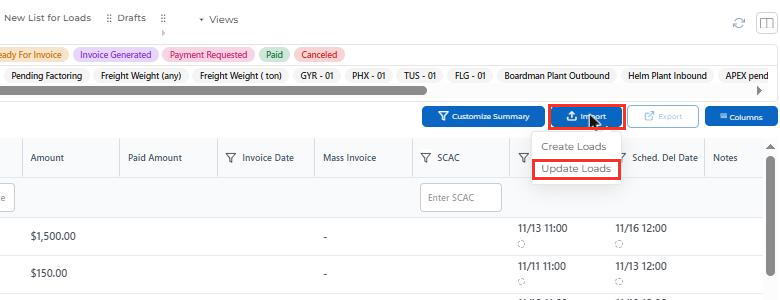
Step 1: Open Update Loads
- Go to Dispatch.
- Click Import.
- Choose Update Loads.
Step 2: Download the template
In the Bulk Update Loads window, click Download Template to get a sample file.
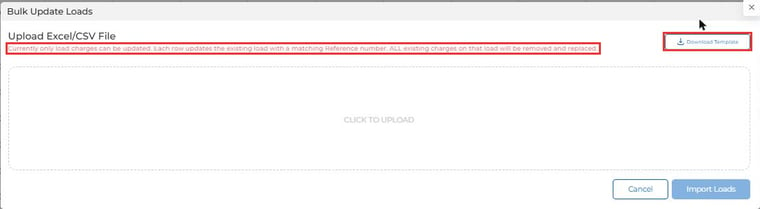
Important: Each row replaces all existing charges on the matching load. Any charge that is not in your file will be removed from that load.
Step 3: Fill in your rate sheet
Your file needs one Reference column, plus one column for each charge you want to set. Name each charge column after the matching account item in Truckpedia, such as Hauling fee, Fuel Surcharge or Lumper.
| Reference | Hauling fee | Fuel Surcharge | Lumper |
|---|---|---|---|
| 90024001 | 1000 | 200 | 100 |
| 90024002 | 1000 | 200 |
- Each row updates the load with the same Reference number.
- Leave a cell blank if that load shouldn't get that charge.
- The template starts with two note lines (starting with #). Delete them before you upload.
Step 4: Upload the file and check the columns
- Click Click to Upload and choose your Excel or CSV file.
- Truckpedia lists each column with a few sample values. Check that each column in Select Type is matched to the right item: Reference for the reference column and the correct account item for each charge.
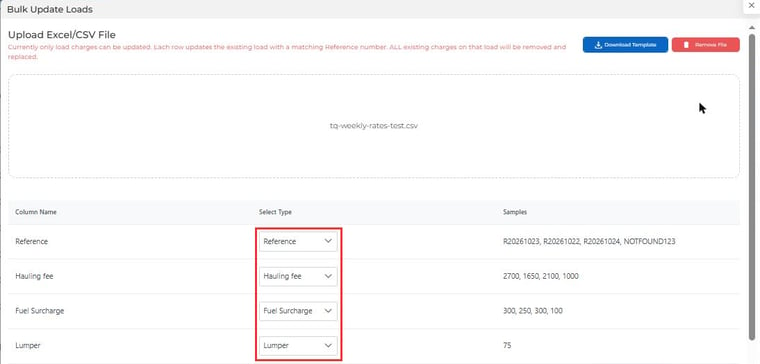
To change a match, open the dropdown and pick a different account item.

Step 5: Import
When everything looks right, click Import Loads. The charges on each matching load are updated.
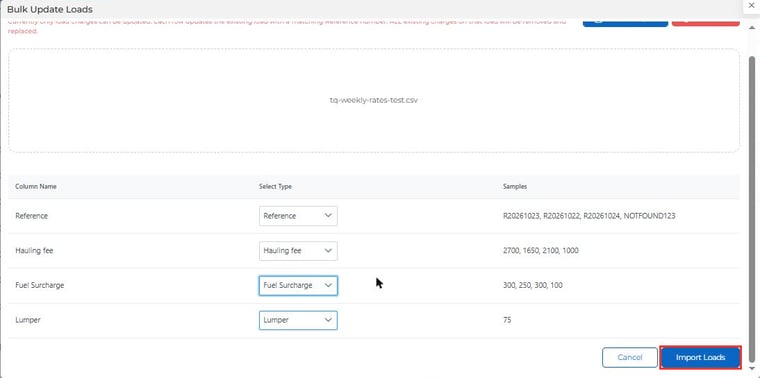
Tip: Spot-check a couple of loads after the import to make sure the new charges look right.
💬 Need help? Contact us anytime at help@truckpedia.io.