
Step 1: Gather Required Information from WEX
Before starting, get the following from WEX:
- WEX username and password for the integration
- A unique reference number for each load you factor
Step 2: Connect WEX in Truckpedia
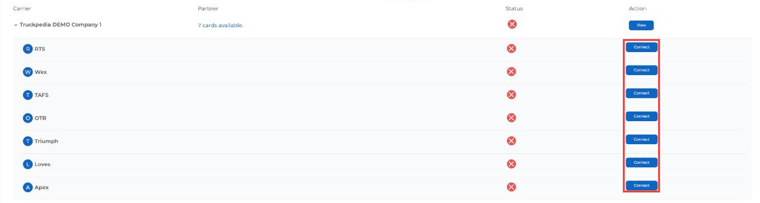
- Click the gear icon at the bottom left, select Integration under Company, and open the Factoring tab.
- Expand your company row and click Connect next to Wex.
- Enter your WEX credentials and click Submit. A green checkmark under Status means the connection worked.
Step 3: Create the WEX factoring company profile
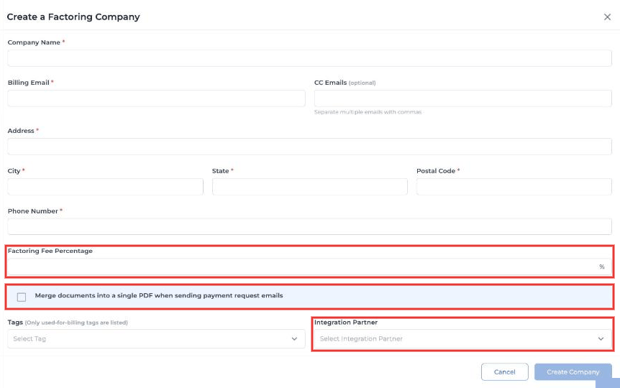
- Go to Settings → Factoring Company and click + Create a Factoring Company.
- Enter WEX’s name, billing email, address and phone, plus your fee percentage.
- Choose Wex as the Integration Partner and click Create Company.
Step 4: Enter the WEX reference number on each load
For every load you factor, enter the WEX-provided reference number in the Internal Reference field in Step 1 of the load. If you don’t see the field, contact help@truckpedia.io to turn it on.
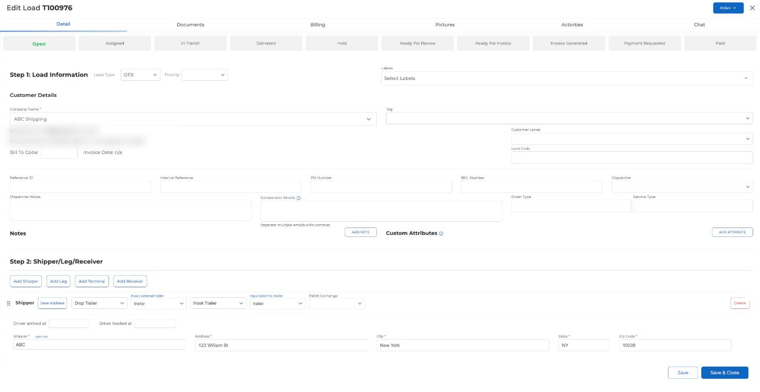
Important: each load needs its own unique reference number from WEX.
Step 5: Test and Verify
- Try to request payment for a load without a reference number. If you get an error asking for the reference number, the setup is correct.
- Add the WEX reference number and request payment again. It should now go through.
Key Reminders
- Each load must have a unique reference number from WEX before you request payment.
- If you can’t see the reference field or run into issues, contact help@truckpedia.io.