
Drivers can ask for days off right from the Truckpedia Driver App. The request goes to the office, and dispatchers get a warning if they try to assign you a load during that time.
How to request time off
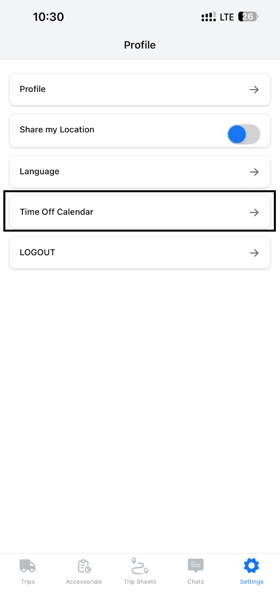
- In the Driver App, tap Settings at the bottom right.
- Tap Time Off Calendar.
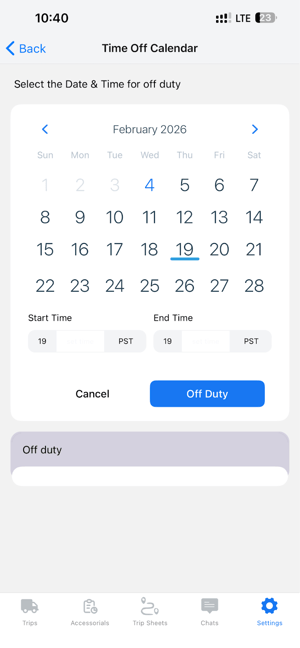
- Pick your dates:
- For one day, tap the date, then tap the same date again.
- For several days, tap the first day, then the last day.
- Enter the Start Time and End Time.
- Tap Off Duty to send the request.
What happens next
- Your request is saved as Requested on your driver profile in the web app.
- The office reviews it and sets it to Approved or Declined.
- While your time off is Requested or Approved, dispatch sees a warning if they try to give you a load on those days.
If your plans change, let your dispatcher know so they can update or remove the request.
For dispatchers and admins
You can review, approve or decline requests, and add time off for a driver yourself, from Assets → Drivers → open the driver → Driver Time Off. See Driver Time Off – How It Works for statuses and how load-assignment warnings work.
Questions? Email help@truckpedia.io.