
Not sure if your company uses V1 or V3? Check in the web app:
- Go to Dispatch.
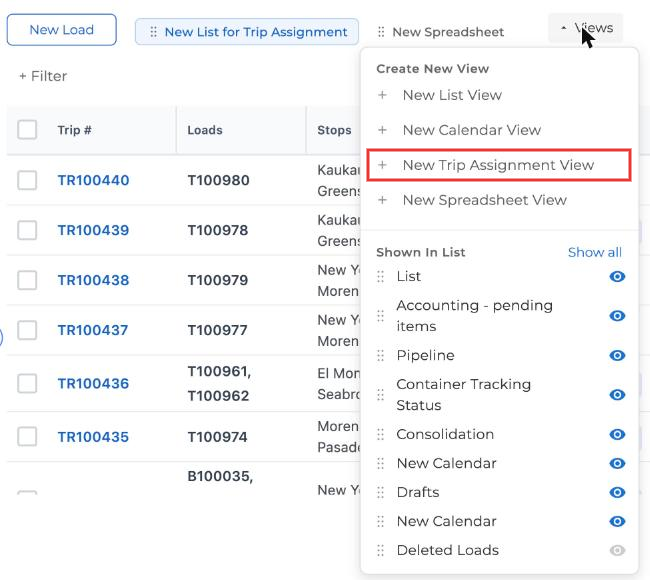
- Click + Views at the top of the page.
- If you see New Trip Assignment View in the list, you're on V3. Use Driver App V3: Trips.
- If you don't see it, you're on V1. Use Driver App V1: Loads.
Simple mode is only available on V1.
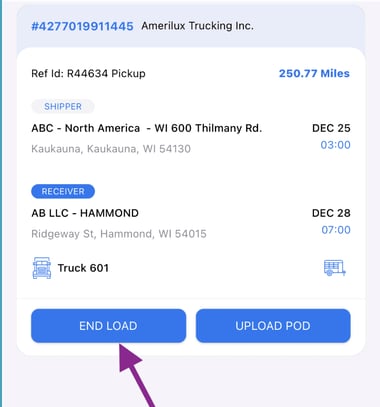
Simple mode is a simpler version of the Truckpedia Driver App, and it's only available on V1. If your company uses V3 (Trips), simple mode isn't an option. Drivers only start a load, end it and upload the POD.
Please note: Simple mode takes away the Arrived, Loaded and Unloaded timestamps, because drivers won't have any buttons other than Start Load and End Load. Without those timestamps, Truckpedia can't track detention or show stop-by-stop progress. For the full app, see Driver App V1: Loads or Driver App V3: Trips.
How to turn on simple mode
- In the Truckpedia web app, click the gear icon at the bottom left to open Settings.
- Under Company, click Customizations.
- Check option 4: Turn on simple mode for the driver's app? Drivers will only need to press the END LOAD and Upload POD buttons.
- Click Submit.
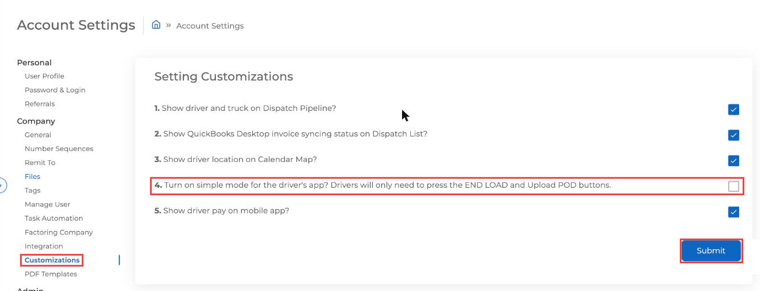
The change applies to all your drivers.
What drivers do in simple mode
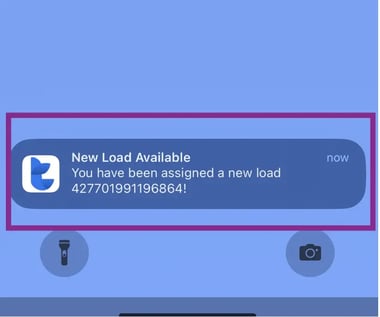
- When a load is assigned, the driver gets a notification. Tapping it opens the load.
- The driver taps Start Load when they head out.
- When the delivery is done, the driver taps Upload POD to take a photo of the signed POD, then End Load.
Finished loads move to the Completed tab, where the driver can still upload a missing POD.
How to turn simple mode off
Go back to Settings → Company → Customizations, uncheck option 4 and click Submit. Your drivers get the full app back.
Questions? Email help@truckpedia.io.