
When you broker loads, you need to know your carriers are insured. Truckpedia lets you save each third-party carrier's Certificate of Insurance (COI) expiration date and emails you a reminder before it runs out, so you never dispatch a load to a carrier whose insurance has lapsed.
Step 1: Add the COI expiration date to the carrier
- Click Carriers in the left menu and click Edit next to the carrier.
- On the Overview tab, make sure Customer Type is set to Carrier. The COI field only shows for carriers.
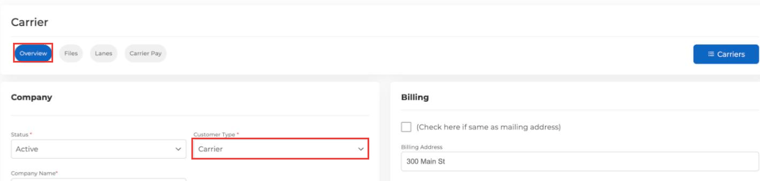
- Scroll down to the Compliance card on the right (below RMIS Information).
- Click COI Expiration Date and pick the date from the carrier's certificate.
- Click SAVE at the bottom of the page.
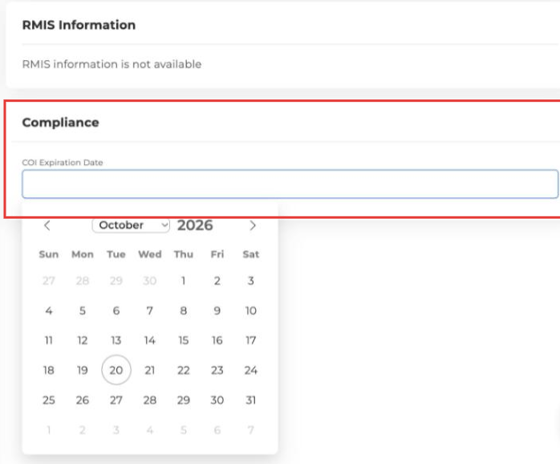
When the carrier sends you a renewed certificate, update the date here. To remove it, clear the field and save.
Step 2: Set up a COI expiration reminder
- Click the Automations icon (the robot) at the bottom left, then Create Automation.
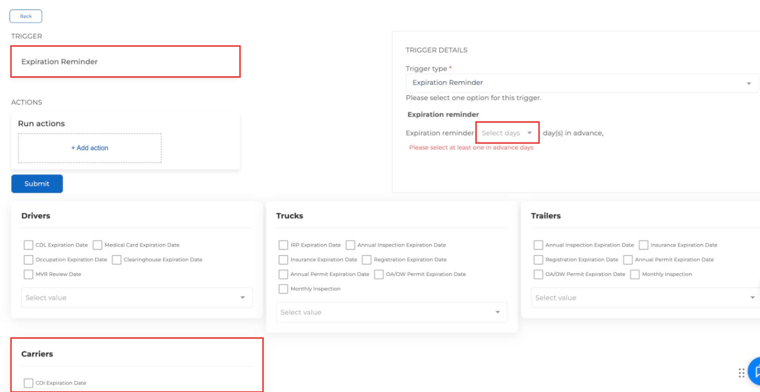
- Under Suggested triggers, choose Expiration Reminder.
- In Trigger Details, pick how many days before the expiration date you want to be reminded (for example 30, 15, 7 and 1). You can pick more than one.
- Scroll down to the Carriers card and check COI Expiration Date.
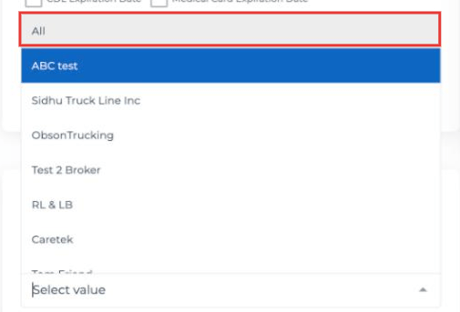
- In the Carriers card, choose which carriers to watch. Pick All to cover every active carrier, or select specific carriers.
- Click + Add action and choose who gets the email, for example the dispatcher or other email addresses.
- Click Submit.
You can add carriers to the same reminder you already use for driver, truck and trailer expiration dates, or keep a separate one just for carriers.
What happens next
Every day, Truckpedia checks your active carriers. When a carrier's COI expiration date is the number of days away you picked, it sends the reminder email with the carrier name and COI expiration date. Inactive carriers are skipped.
Tips for using COI reminders
- Add the COI date when you first set up a carrier, so no carrier slips through.
- Pick at least two reminder days (for example 30 and 7) so the carrier has time to send a new certificate.
- Send the reminder to whoever handles carrier compliance, not just dispatch.
- Update the date as soon as you get the renewed certificate, or the reminders will keep going out.
Related: How Do I Set Up Automations in Truckpedia?
Questions? Email help@truckpedia.io.